

Step 12
After installation, you will have an icon in the system tray for the APC UPS daemon. When the system tray icon turns from a question mark into a plug
  , you have successfully connected to the
remote NetManager that is monitoring your UPS. If the system tray icon
remains as a question mark , the computer was not
able to connect. Perhaps you have mistyped the hostname of your Netmanager?
, you have successfully connected to the
remote NetManager that is monitoring your UPS. If the system tray icon
remains as a question mark , the computer was not
able to connect. Perhaps you have mistyped the hostname of your Netmanager?
When the UPS switches to the battery, the battery icon  will appear in the system tray. While the UPS is online, if the battery is not at
least 99% charged, the plug icon will become a plug with a lightning bolt in the middle
will appear in the system tray. While the UPS is online, if the battery is not at
least 99% charged, the plug icon will become a plug with a lightning bolt in the middle
 to indicate that the battery is charging.
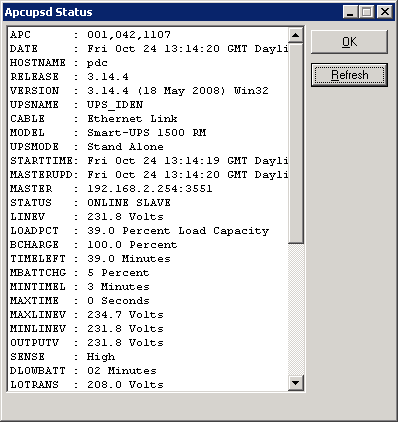
Right-click on the system tray icon and a menu will appear. Select the Events item, and the Events dialogue box should appear. There should be no error messages. By right-clicking again on the system tray plug and selecting the Status item, you can verify that all the values for your UPS are correct as show below.